Software DevelopmentDecember 11, 2025
Cloud Security 101: Insights and best practices unveiled
This article takes you on a comprehensive tour of cloud security – from understanding the types of threats to which cloud systems are subjected to actionable measures for fortifying your cloud infrastructure to DevOps’s pivotal role in elevating your cloud security strategy.
Roksana Radecka
- Development
- DevOps
- Cloud

As businesses increasingly shift their digital infrastructure to the cloud, the conversation around cloud security becomes an important focus point.
According to the 2023 Thales Cloud Security Study, 39% of the almost 3,000 IT and security professionals reported data breaches in their cloud environments over the previous year. This statistic illustrated that securing cloud infrastructures isn’t a task to be deferred or taken lightly – it’s a business-critical mandate.
This article takes you on a comprehensive tour of cloud security – from understanding the types of threats to which cloud systems are subjected to actionable measures for fortifying your cloud infrastructure to DevOps’s pivotal role in elevating your cloud security strategy.
Security in a cloud environment
One of the strongest arguments favoring cloud-based systems over on-premise solutions is the level of security.
Cloud providers like AWS, Azure, and Google Cloud invest heavily in state-of-the-art security protocols that are more robust than most companies could ever achieve independently. These providers have dedicated security teams that protect the infrastructure, run regular audits, and implement the latest security technologies. This translates into built-in security benefits for their customers, which are more effective and cheaper than what could be implemented by an in-house IT department.
Additionally, cloud providers offer a wide range of security services and features, such as advanced firewalls, data encryption, and intrusion detection systems. This allows businesses to customize their security settings to suit their specific needs, all without the overhead of managing and maintaining physical hardware.
Types of cybersecurity threats
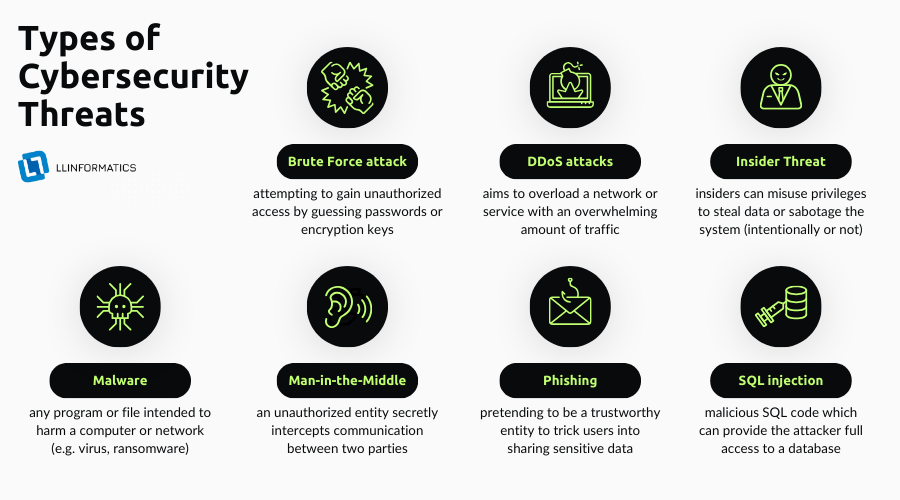
Understanding the cybersecurity threats you may encounter is crucial for crafting an effective defense strategy. Below are some of the most common types of security threats in digital systems:
Brute Force Attack
This type of threat involves an attacker attempting to gain unauthorized access by guessing credentials such as passwords or encryption keys through systematic trial and error.
Unlike other attacks, brute force relies on sheer computing power and persistence rather than exploiting system vulnerabilities. Common methods include dictionary attacks, executed by testing a list of likely passwords, and exhaustive key search, which tries all possible values. Hence, if a system accepts an infinite number of failed attempts to log in, it is a misconfiguration issue.
Imagine what would happen if you had 10,000 attempts to guess a four-digit PIN number?
Distributed Denial of Service (DDoS)
DDoS attacks aim to overload a network or service with overwhelming traffic, rendering it slow or entirely inaccessible. The attack usually involves multiple systems working together to flood the target.
Remember that your system can be “DDoSed” by an accident. This usually happens if an online shop starts a sale and is flooded by customers. Even the most sophisticated cloud-based systems need some time to scale up and be able to accept the increased load.
Such incidents can occur even with the internal systems, e.g., when 10,000 employees would want to read a freshly published internal article.
Insider Threat
Insider security threats come from individuals within the organization, such as employees, contractors, or other agents who have information concerning the organization’s security practices, as well as access to its data and computer systems. The risk here is that these insiders have the potential to misuse their privileges to steal data or intentionally sabotage the system.
uch an attack can also occur unintentionally. For example, it’s not uncommon for the attacker to leave a USB stick on a parking lot, hoping an employee finds it. An untrained individual would be curious to know what is inside the stick, and by plugging it in, they would install malicious software on their computer and the network.
Also, such a threat may occur when an unskilled employee gets too much access and misuses it (even accidentally). It is important to perform access audits and give as little access and privileges as possible.
Malware
Malicious software, or malware, is any program or file intended to harm a computer or network. Types of malware include viruses, worms (essentially, computer viruses that can self-replicate across a network without human action), Trojan Horses (malware that disguises itself as a legitimate program), and ransomware. Once inside the system, they can do anything from stealing data, logging keystrokes, and corrupting files.
It is a good practice to restrict software that can be installed on an organization's computer. Moreover, up-to-date and high-quality anti-virus protection can come in handy.
Man-in-the-Middle Attack
This type of attack involves an unauthorized entity secretly intercepting and possibly altering the communication between two parties. Man-in-the-middle attacks can occur in various forms, including session hijacking, email eavesdropping, or HTTPS spoofing.
Phishing
In a phishing attack, the attacker masquerades as a trustworthy entity to trick users into sharing sensitive data such as passwords or credit card numbers. This often happens through deceptive emails that appear to be from reputable sources. Moreover, such emails try to force immediate action by saying, “Please do it now! I really need it!”.
Since such attacks do not occur every day (and employees might not be prepared for them) a good practice involves training by sending fake phishing emails by the organization’s IT Security department. This will show people what such attacks look like and how to protect against them. Also, an anti-phishing policy should be in place in an organization.
SQL Injection
SQL Injection is a type of attack that targets databases through flawed web applications. The attacker inserts malicious SQL code into input fields, which then get executed, potentially giving the attacker full access to the database. This can lead to unauthorized viewing, modification, or deletion of sensitive data.
A good practice includes creating a “SQL Injection Attack Cheat Sheet” which will help detect potential threats. Also, implementing tests that will validate if the systems are resistant against such threats should be a must.
Understanding these types of threats helps you recognize the enemy and enables you to build more robust security measures to protect your cloud-based systems.
How to ensure security in cloud environments?
From encryption to firewalls, compliance standards, and internal company policies, we delve into essential practices that collectively form a robust defense against unauthorized access and potential threats.
Encryption
Encryption transforms input data into unreadable text, which only the encryption key can decode. This is a robust barrier against unauthorized attempts to access the information and is an essential practice for securing sensitive data.
It’s important to employ robust encryption algorithms and manage your encryption keys with utmost care to maximize effectiveness.
Modern encrypting standards such as AES-256 and/or RSA-4096 should be used to provide a high level of security.
Keep in mind that unbreakable encryption does not exist.
Multi-Factor Authentication (MFA)
MFA enhances security protocols by demanding multiple forms of identity verification before granting access. Instead of solely relying on a password, this process necessitates at least one additional verification step – such as access confirmation on another device, security codes, or biometric data – creating a more robust security environment.
Firewalls
Firewalls act as gatekeepers for your network, scrutinizing incoming and outgoing traffic based on a set of predefined rules. Adequately configuring these rules helps keep out unauthorized users while enabling secure data transmission. This layer of control is crucial for isolating and protecting cloud-based systems.
Compliance Standards
Being compliant with data privacy standards like GDPR (General Data Protection Regulation), HIPAA (Health Insurance Portability and Accountability Act), and PCI-DSS (Payment Card Industry Data Security Standard) might be mandatory, depending on your business’ location and industry.
However, even if you’re not obliged to follow them, it still might be a good idea, as these standards are internationally recognized references for data privacy and security best practices.
Passwords Manager
Using highly sophisticated and well-encrypted software to store passwords will help you keep your data safe. In the modern world, many systems require strong passwords that are humanly impossible to remember. Moreover, passwords’ rotation, being a good practice itself, might lead to passwords’ degeneration.
Imagine if you have 3 different systems where you are required to change the passwords once every month and you do not have a password manager. Sooner or later, you will be updating them to something similar, easy to remember for you and easy to break for somebody else. Just a reminder: the two most common passwords on the internet include “123456” and “admin”.
Internal Company Policies
Last but not least, your internal company policies can be one of the most potent tools in your security arsenal. These policies should outline the dos and don’ts for employees regarding data handling, access levels, and use of cloud services.
Regular training and audits can ensure everyone in the organization understands and adheres to these policies, thereby minimizing the human error factor, which is often a significant security risk.
By taking these measures, you can create a robust security environment for your cloud systems.
How DevOps helps to protect cloud systems
DevOps isn’t just about speeding up your software delivery cycle; it’s also a significant player in fortifying your cloud security posture. Here’s how:
- Automation Reduces Human Error: By automating repetitive tasks, DevOps minimizes the chance of human error, which is often the root cause of security breaches. Automated security checks can be integrated into the CI/CD pipeline, ensuring that vulnerabilities are identified and addressed before deployment.
- Configuration Management: DevOps tools enable consistent and automated configuration management. This ensures all deployed resources adhere to a predefined security baseline, reducing the attack surface.
- Continuous Monitoring: DevOps isn’t a “set it and forget it” model; it involves continuous infrastructure monitoring. This ongoing vigilance enables quicker detection of vulnerabilities or irregularities, allowing immediate corrective actions. Also, reacting quickly and professionally to detected issues is paramount for effective monitoring.
- Immutable Infrastructure: In a DevOps model, infrastructure is often treated as code (Infrastructure as Code - IaC). A compromised component can be immediately replaced with a secure version, minimizing the potential damage from attacks like data breaches or malware.
- Integrated Security Testing: DevOps encourages a “shift-left” approach to security, embedding it earlier in the software development lifecycle. This includes practices like DevSecOps, where security testing is done in the development phase rather than being left for the end, thus making security a shared responsibility across the teams.
- Secure Collaboration: DevOps enhances communication between the Development and Operations teams, making it easier to address security concerns collaboratively and proactively rather than as an afterthought.
- Multiple environments: using different environments that are copies (or parts of the production environment) also helps finding issues and threats in the early stage. Thanks to the IaC approach, you can easily create dev, stage, test, pre-prod environments and much more.
Incorporating DevOps into your cloud security strategy is not an option; it’s a necessity. It provides the continuous improvement model that security practices need in today’s fast-paced and ever-evolving threat landscape.
Cloud security checklist
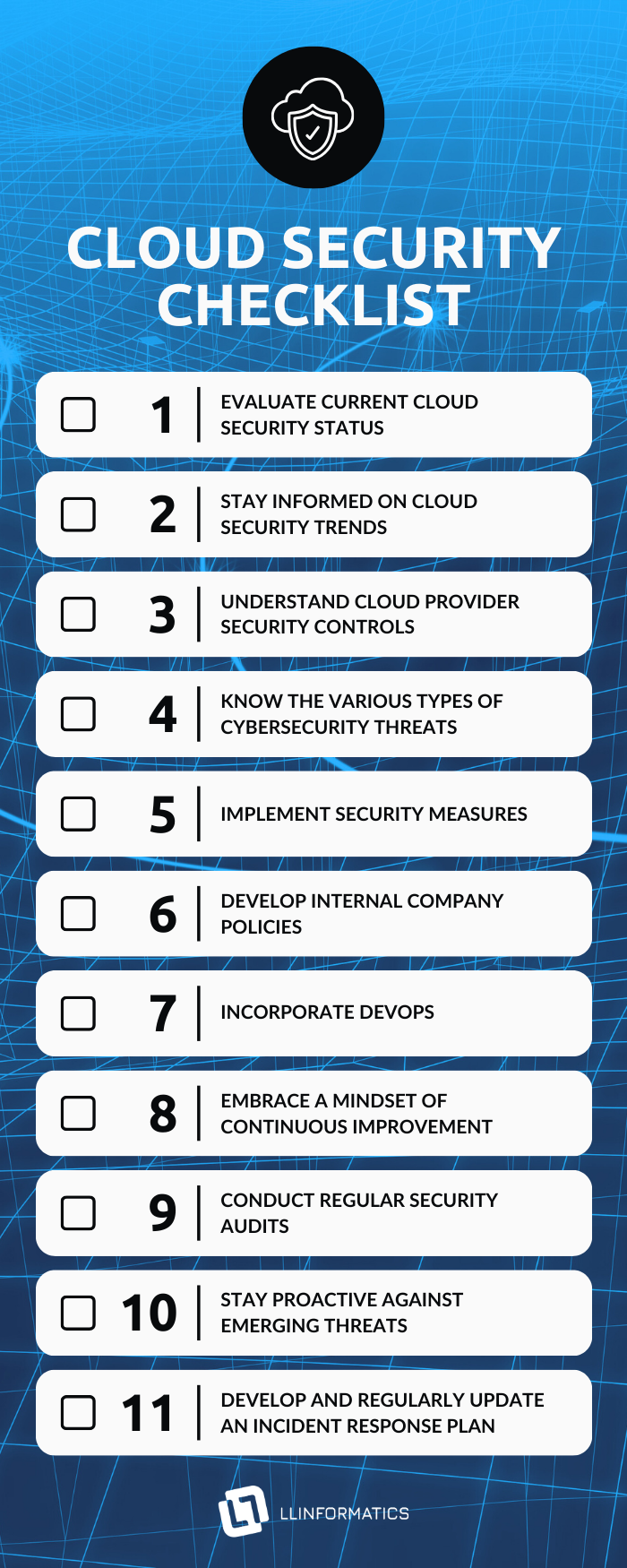
Navigating the labyrinth of cloud security can be daunting, but it’s a challenge that businesses can’t afford to sidestep. From understanding the myriad of cybersecurity threats to implementing best practices, mastering cloud security is an ongoing endeavor. But remember, you don’t have to go it alone. Leveraging DevOps can be your ace in the hole, transforming security from a bottleneck into a streamlined, integral part of your business operations. Adopt a security-first mindset, employ DevOps, and make your cloud fortress impenetrable.
- Evaluate current cloud security status:
- Assess the current state of your cloud security.
- Review any past incidents or data breaches.
- Stay informed on cloud security trends
- Regularly update yourself on the latest trends and developments in cloud security.
- Understand cloud provider security controls:
- Familiarize yourself with the security protocols and features provided by your cloud provider (e.g., AWS, Azure, Google Cloud).
- Types of cybersecurity threats:
- Understand common threats such as brute force attacks, DDoS attacks, insider threats, malware, man-in-the-middle attacks, phishing, and SQL injection.
- Implement security measures:
- Ensure robust encryption practices are in place for sensitive data.
- Implement MFA for added security.
- Configure firewalls to control incoming and outgoing traffic.
- Align with and adhere to relevant compliance standards (e.g., GDPR, HIPAA, PCI-DSS).
- Develop internal company policies:
- Establish clear and comprehensive internal policies regarding data handling, access levels, and cloud service usage.
- Conduct regular training and audits to ensure employees understand and comply with these policies.
- DevOps integration:
- Understand the role of DevOps in enhancing cloud security.
- Emphasize automation to reduce human error.Implement configuration management for consistent security baselines.
- Ensure continuous monitoring for quick vulnerability detection.Consider adopting an "immutable infrastructure" approach for enhanced security.
- Integrate security testing early in the development lifecycle through practices like DevSecOps.
- Encourage secure collaboration between development and operations teams.
- Continuous improvement:
- Acknowledge that cloud security is an ongoing process.
- Embrace a mindset of continuous improvement in response to evolving threats.
- Regular security audits:
- Conduct regular security audits to identify vulnerabilities and areas for improvement.
- Take proactive measures based on audit findings.
- Stay proactive against emerging threats:
- Stay informed about emerging cybersecurity threats and adapt security measures accordingly.
- Incident response plan:
- Develop and regularly update an incident response plan in case of a security breach.
- Ensure all relevant stakeholders are aware of and understand the plan.
By following this checklist, business owners can enhance the security of their cloud systems and better protect their digital assets.
FAQ: Cloud Security
1. What is cloud security?
Cloud security refers to the set of measures and technologies designed to protect data, applications, and infrastructure in cloud computing environments. It encompasses a wide range of practices aimed at safeguarding information and ensuring the integrity and availability of cloud resources.
2. Why is cloud security important?
Cloud security is crucial because it addresses the unique challenges associated with storing and processing data in the cloud. It helps prevent unauthorised access, data breaches and ensures compliance with regulations. Effective cloud security measures also build trust among users and enable the safe adoption of cloud services.
Cloud safety is critical as the majority of organisations currently use cloud services.
3. What are the common cloud security risks?
Common threats include data breaches, unauthorised access, insecure APIs, insecure interfaces, account hijacking, and denial of service attacks. Understanding these cloud security risks is essential for implementing robust cloud security.
4. What are the 3 categories of cloud security?
Cloud security can be broadly categorised into three main categories, often referred to as the "Cloud Security Triad" or "Cloud Security Pillars." are data security, identity and access management (IAM) and infrastructure security. These categories encompass different aspects of security in the cloud environment:
Data Security
- Data Encryption: Encrypting data both in transit and at rest to protect it from unauthorised access. This ensures that even if data is intercepted or accessed, it remains unintelligible without the proper decryption keys.
- Access Controls: Implementing proper access controls and identity management to ensure that only authorised individuals have access to sensitive data. This includes user authentication, authorisation, and auditing.
- Data Loss Prevention (DLP): Employing measures to prevent the unauthorised transfer or leakage of sensitive data. DLP solutions can monitor and control data movements within and outside the cloud environment.
Identity and Access Management (IAM)
- User Authentication: Verifying the identity of users accessing cloud resources through various authentication methods, such as passwords, MFA, and biometrics.
- Authorisation: Defining and enforcing policies that determine the level of access granted to authenticated users. This ensures that users have the necessary permissions to perform their tasks without unnecessary privileges.
- Privilege Management: Limiting access to sensitive resources based on the principle of least privilege. Users should have the minimum level of access required to perform their job functions.
Infrastructure Security
- Network Security: Implementing measures to secure the cloud infrastructure's network, including firewalls, intrusion detection and prevention systems, and virtual private networks (VPNs).
- Host Security: Securing the virtual machines and servers in the cloud, including regular patching, antivirus measures, and the use of security best practices for configuring operating systems.
- Container Security: In containerisation technologies like Docker or Kubernetes, securing containers and their orchestration environments is crucial to prevent container-specific vulnerabilities and attacks.
These three categories work together to provide a comprehensive approach to cloud security, addressing different dimensions of the cloud computing environment. By focusing on data security, identity and access management, and infrastructure security, organisations can build a strong foundation for a secure and resilient cloud environment.
5. How can organisations ensure cloud compliance?
Achieving and maintaining compliance in the cloud involves understanding and adhering to relevant regulations and industry standards. This may include data protection laws, industry-specific compliance requirements, and implementing security controls and audit processes.
6. How can businesses ensure the physical security of their cloud infrastructure?
While cloud provider handle the physical security of data centers, business should implement access controls, monitor user activity, and conduct regular assessments to identify and address potential vulnerabilities.
7. What role do cloud providers play in ensuring cloud security?
Cloud service providers play a critical role in implementing and maintaining the security of their infrastructure. They invest in state-of-the-art security and cloud compliance certifications. However, cloud security is a shared responsibility between the cloud provider and the customer. While cloud providers are responsible for the security of the cloud infrastructure, physical access to the data centers, etc. customers are responsible for securing their data and applications within that infrastructure.
8. What is the difference between cloud security and cyber security?
Cloud security and cybersecurity are related concepts, but they differ in their scope and focus. Here's a breakdown of the key differences between the two:
- Scope:
- Cloud Security: This specifically refers to the security measures and practices implemented to protect data, applications, and infrastructure within a cloud computing environment. It addresses the unique challenges and considerations associated with cloud services, including issues related to data storage, network security, and access controls in cloud platforms.
- Cybersecurity: This is a broader term that encompasses the protection of information systems, networks, devices, and data from a wide range of cyber threats. Cybersecurity includes securing not only cloud-based resources but also on-premises systems, networks, endpoints, and the overall digital environment.
- Environment:
- Cloud Security: Focuses on securing resources and services provided by cloud computing platforms, such as Infrastructure as a Service (IaaS), Platform as a Service (PaaS), and Software as a Service (SaaS). It considers the shared responsibility model, where both the cloud service provider and the customer have specific security responsibilities.
- Cybersecurity: Encompasses a broader spectrum, including security measures for both cloud and on-premises environments. It addresses threats and vulnerabilities across various technologies and infrastructures, irrespective of whether they are hosted in the cloud or on traditional servers.
- Concerns and Challenges:
- Cloud Security: Addresses challenges unique to cloud environments, such as securing data stored in shared cloud storage, managing access controls in a multi-tenant environment, and ensuring the security of virtualised infrastructure.
- Cybersecurity: Deals with a wide array of threats, including malware, phishing, ransomware, and other cyberattacks that can target any part of an organisation's digital infrastructure, regardless of whether it is hosted in the cloud or on-premises.
- Responsibility:
- Cloud Security: Involves a shared responsibility model where the cloud service provider is responsible for the security of the cloud infrastructure, and the customer is responsible for securing their data, applications, and configurations within that infrastructure.
- Cybersecurity: Encompasses the organisation's overall responsibility for securing its entire digital landscape, regardless of the specific technology or hosting environment.
In summary, while cloud security is a subset of cybersecurity, it specifically focuses on securing cloud-based resources and services. Cybersecurity, on the other hand, is a broader discipline that addresses security concerns across all types of digital environments, including both cloud and traditional on-premises systems. Keep in mind that at the end of the day, there is no such thing as a “cloud”. There’s just someone else’s computer.