Technology, innovation, and AIDecember 11, 2025
AI tools in software development: risks and benefits
The rapid evolution of artificial intelligence (AI) has permeated various industries, and software development is no exception. A Gartner poll conducted in early 2024 predicts that by 2028, 75% of software engineers will use generative AI code assistants. This marks a substantial rise from early 2023 when fewer than 10% of coders employed these tools. What does it mean for your project?
Roksana Radecka
- Future of work
- Programming concepts
- Development
- Quality Assurance
The rapid evolution of artificial intelligence (AI) has permeated various industries, and software development is no exception. A Gartner poll conducted in early 2024 predicts that by 2028, 75% of software engineers will use generative AI code assistants. This marks a substantial rise from early 2023 when fewer than 10% of coders employed these tools. What does it mean for your project?
Benefits of AI coding assistants
One of the most significant benefits of AI-charged code generation is a boost in productivity. These tools can automate repetitive and mundane tasks, such as code formatting, syntax corrections, and basic debugging.
By handling these routine activities, AI development assistants free up developers to focus on more complex and creative aspects of their work. This leads to faster development cycles and allows teams to deliver projects more swiftly. Furthermore, it reduces the risk of human error in these routine operations.
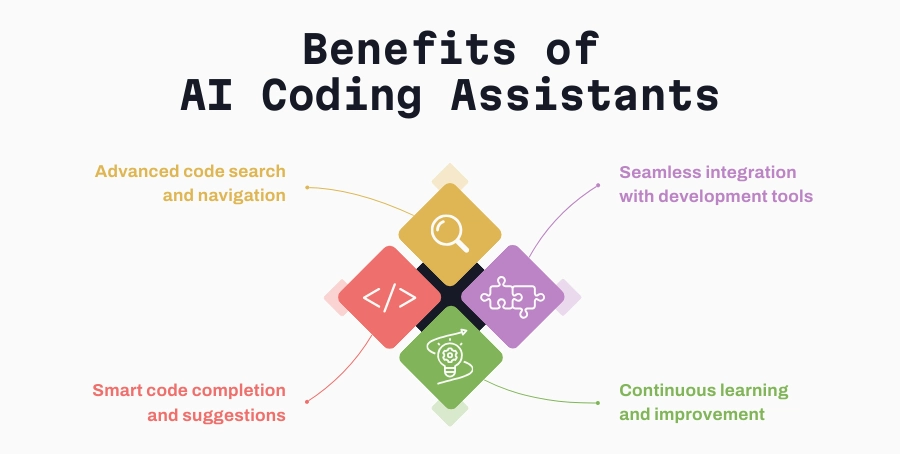
Advanced code search and navigation
Navigating large codebases can be challenging, especially when trying to understand legacy code or track down specific functionalities. AI coding tools offer advanced code search and navigation capabilities, allowing developers to quickly locate relevant sections of code, understand dependencies, and trace the flow of execution. This is particularly beneficial in large-scale projects where understanding the entire codebase is impractical for any single developer.
Smart code completion and suggestions
While traditional IDEs offer basic code completion, AI development assistants take it a step further with context-aware suggestions. These tools analyze the current context of the code, previous patterns, and even the developer's coding style to provide more accurate and useful suggestions. This can significantly speed up coding by reducing the amount of time spent typing and correcting code. However, it's important to note that these suggestions are not infallible and can be incorrect approximately 32% of the time, requiring developers to verify the AI-generated code.
Seamless integration with development tools
AI development assistants integrate seamlessly with popular development environments and tools, such as Visual Studio Code, IntelliJ IDEA, and GitHub. This integration ensures developers can leverage AI capabilities without disrupting their existing workflows. For example, AI can assist in version control by suggesting commit messages, identifying potential merge conflicts, and recommending resolution strategies.
Continuous learning and improvement
AI coding tools continuously learn from the developer's interactions and the code they work on. This ongoing learning process allows the AI to improve its suggestions and adapt to the specific needs and preferences of the development team. Over time, this results in more accurate and contextually relevant assistance, although it still requires senior software developer oversight to ensure reliability.
Enhancing developer happiness
A significant 60–75% of users stated that GitHub Copilot helps them feel more content with their job, experience less coding frustration, and concentrate on more gratifying tasks.
The biggest challenges of AI tools for code generation
AI development assistants are transforming the landscape of software engineering. Their ability to enhance productivity, save time on repetitive tasks, provide advanced code navigation, and offer smart code completion makes them indispensable tools for modern development teams. However, it is crucial to remain aware of their limitations. A 2023 study by researchers at Bilkent University found that AI assistants produced code with a 30.5% error rate, while an additional 23.2% of the code was only partially correct. The accuracy rates varied among different AI code generators and here's how it can affect your project.
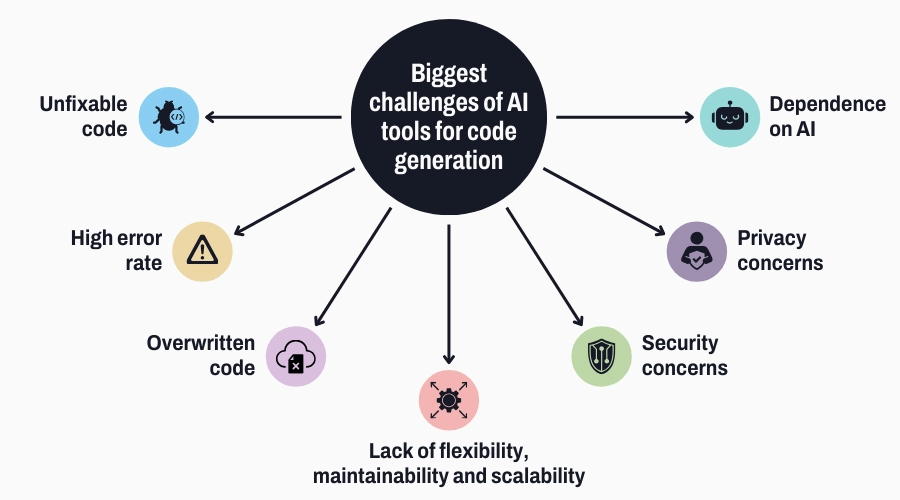
Unfixable code written by AI
AI-charged code often lacks the intuition and contextual awareness of human developers. This results in code that, while syntactically correct, can be semantically puzzling. Developers tasked with maintaining such code frequently face significant challenges. The AI's approach to solving a problem might involve unconventional patterns or algorithms that aren't well-documented or commonly understood, leading to difficulties in debugging and extending the code.
Lack of documentation and rationale behind AI-generated solutions
AI tools typically don’t provide comprehensive documentation or explanations for their code. This absence of rationale makes it hard for developers to grasp why certain decisions were made, complicating efforts to modify or enhance the code. Without proper documentation, the code becomes a black box, and developers must spend considerable time reverse-engineering it to understand its functionality and purpose.
High error rate of AI assistants
AI coding assistants are prone to errors, such as syntax mistakes, logic flaws, and improper use of libraries or APIs. These errors stem from the AI's limited understanding of context and the specific nuances of the codebase it is working on. Codesignal's poll showed that 55% of developers have concerns about the quality of AI code and 48% voice concerns about security and/or privacy.
Impact of a 30.5% error rate on project timelines and costs
A 30.5% error rate can have a profound impact on project timelines and costs. For every ten lines of code generated, three may require significant rework, delaying development schedules and increasing labor costs. The time spent identifying and correcting these errors can negate the productivity gains from using AI tools, making them less appealing for critical projects.
Overwritten code and complex architectures
One major risk with AI tools is their potential to overwrite existing, functional code. This can occur when the AI misinterprets the requirements or attempts to optimize code without understanding its current functionality. Such overwrites can introduce new bugs and regressions, disrupting the stability of the application.
Challenges in integrating AI-generated code with existing architectures
Integrating AI code into existing architectures can be fraught with difficulties. AI coding might not adhere to the architectural patterns and design principles already in place, leading to conflicts and inconsistencies. This can result in a disjointed codebase that is harder to maintain and scale.
The complexity added by AI solutions and its impact on project maintainability
AI assistant's code might involve advanced algorithms or patterns that are not well understood by the team, making future modifications challenging. This added complexity can increase the technical debt of a project, complicating maintenance and reducing overall code quality.
Lack of flexibility, maintainability, and scalability
AI-generated code tends to be rigid and inflexible, making it difficult to adapt to changing requirements. Unlike human developers who can anticipate future needs and design code with extensibility in mind, AI coding often produces solutions that are narrowly focused on the initial problem statement.
Maintenance challenges posed by AI-created solutions
Maintaining AI-charged code can be more challenging than maintaining human-written code. The lack of context and documentation, combined with potential unconventional coding practices, makes it harder for developers to understand and modify the code. This can lead to increased maintenance costs and longer turnaround times for bug fixes and enhancements.
Scalability issues due to non-optimized AI code structures
AI-charged code might not be optimized for performance and scalability. The AI assistants's lack of understanding of the broader system architecture can result in solutions that do not scale well under increased load or that perform poorly in production environments. Addressing these issues often requires significant refactoring and optimization by experienced developers.
Security concerns from a business standpoint
AI tools can inadvertently introduce security vulnerabilities into the codebase. These vulnerabilities might arise from improper handling of user inputs, incorrect implementation of security protocols, or the use of insecure libraries. Such vulnerabilities can be exploited by attackers, posing significant risks to the application and its users.
Risks of relying on AI for security
Relying on AI for security-critical components is particularly risky. The AI might not fully understand the intricacies of security requirements, leading to implementations that are susceptible to attacks. Human oversight is crucial in these scenarios to ensure that security measures are correctly and thoroughly applied.
Business implications of security vulnerabilities
Security breaches resulting from AI-generated code can have severe business implications. These include financial losses, reputational damage, legal liabilities, and regulatory penalties. Ensuring the security of AI coding assistant's code is therefore paramount to protecting the business and its stakeholders.
Dependence on AI
Over-reliance on AI coding can lead to a decline in developer skills. If developers become too dependent on AI for routine coding tasks, they may not develop the problem-solving skills and deep understanding of the codebase necessary for more complex tasks. This skill erosion can be detrimental to the team's overall effectiveness and innovation capacity.
Risk of AI coding without proper human oversight
AI-charged code without proper human oversight can lead to a host of issues, from functional errors to security vulnerabilities. Ensuring that human developers review and refine AI-generated code is essential to maintaining code quality and project integrity.
Security and Privacy Issues
AI tools themselves can have vulnerabilities that, if exploited, could compromise the security of the entire development environment. These vulnerabilities might include insecure APIs, improper access controls, and insufficient protection of sensitive data.
Data Privacy Concerns with AI Tools Processing Sensitive Information
AI tools often process large amounts of data, including sensitive information. Ensuring that these tools comply with data privacy regulations and standards is critical to preventing data breaches and protecting user privacy. This involves implementing strong data encryption, access controls, and audit mechanisms to safeguard sensitive information.
Limitations of AI assistant tools
Despite their advanced capabilities, AI coding assistants have several limitations:
- Context limitations: AI coding assistants might not fully grasp the broader context of a project, leading to code suggestions that are technically correct but contextually inappropriate.
- Creativity and innovation: AI assistants can generate code based on existing patterns and best practices, but they might struggle with highly innovative or creative solutions that deviate from common patterns.
- Specialized knowledge: They may not have deep expertise in niche domains or specialized fields, where human experts with specific knowledge are necessary.
- Dependency on training data: The effectiveness of AI coding assistants depends on the quality and diversity of the training data. If the training data lacks examples of specific use cases, the assistant’s code suggestions may be less relevant.
- Ethical and security considerations: AI-charged code can sometimes include insecure or unethical practices if such patterns were present in the training data. Human oversight is necessary to ensure code quality and adherence to ethical standards.
- Bias and errors: AI models can exhibit biases based on their training data, leading to code suggestions that reflect those biases. Additionally, they might generate errors or suboptimal code, requiring careful review by developers.
- Learning and adaptation: While some AI assistants can learn and adapt to user preferences, this process may take time and may not always align perfectly with the user’s specific needs or coding style.
- Integration challenges: Integrating AI coding assistants into existing workflows and toolchains can sometimes be challenging, especially in highly customized or proprietary.
Strategies to mitigate and manage AI-induced errors
While AI tools offer significant benefits in software development, including increased productivity and automation of routine tasks, they also pose substantial challenges and risks.
Addressing these challenges requires a balanced approach that combines the strengths of AI with the expertise and oversight of human developers. This includes automated testing, code reviews by experienced, senior developers, and continuous integration systems that can catch and address errors early. Pairing AI-charged code with human oversight ensures that errors are caught before they can propagate through the codebase.
FAQ AI coding assistant tools
1. What are AI coding assistants?
AI coding assistants are software tools powered by artificial intelligence designed to help developers write, debug, and optimize code more efficiently. These assistants leverage machine learning, natural language processing (NLP), and large datasets of existing code to provide various functionalities, including:
- Code completion: AI coding assistants can predict and suggest the next part of the code based on the context and syntax being used. This helps in speeding up the coding process and reducing syntax errors.
- Code generation: These tools can generate code snippets or even entire functions based on a description or comment provided by the developer. This is particularly useful for repetitive coding tasks or for generating boilerplate code.
- Debugging: AI coding assistants can identify bugs or potential issues in the code by analyzing patterns and common mistakes. They can suggest fixes or point out problematic areas, making debugging more efficient.
- Code review: AI tools can assist in code review by providing suggestions for improvements, identifying code smells, and ensuring adherence to coding standards and best practices.
- Documentation: These assistants can generate documentation for code, including comments and docstrings, which help in making the code more understandable and maintainable.
- Learning and assistance: AI coding assistants can help developers learn new programming languages or frameworks by providing contextual examples, explanations, and recommendations.
2. What are popular AI coding assistants?
There are many coding assistants out there (see image above), but here are four of the most noteworthy:
- GitHub Copilot: Developed by GitHub in collaboration with OpenAI, GitHub Copilot is an AI-powered code completion tool that suggests whole lines or blocks of code as you type, based on the context of the project.
- Features:
- Context-aware code suggestions
- Autocompletion of entire lines and blocks of code
- Integration with Visual Studio Code
- Support for multiple programming languages
- Learning from a vast dataset of public code repositories
- Features:
- Tabnine: An AI coding assistant that supports multiple programming languages and integrates with various IDEs to provide context-aware code suggestions.
- Features:
- Intelligent code suggestions
- Integration with IDEs like Visual Studio Code, IntelliJ IDEA, Sublime Text, and more
- Support for numerous programming languages
- Customization of code suggestions based on user preferences
- Local model option for enhanced privacy
- Features:
- Kite: An AI coding assistant that offers code completions, documentation, and function signatures within the IDE to help developers write code faster and with fewer errors.
- Features:
- Code completions and snippets
- In-line documentation and function signatures
- Integration with IDEs such as Visual Studio Code, PyCharm, Atom, and more
- Support for Python, JavaScript, and other languages
- Machine learning models that improve over time with usage
- Features:
- Codota: A tool that provides intelligent code suggestions based on the analysis of millions of open-source code repositories.
- Features:
- Contextual code suggestions
- Support for Java, JavaScript, Python, and other languages
- Integration with IDEs like VS Code, IntelliJ IDEA, and Eclipse
- Learning from a large dataset of public code repositories
- Ability to analyze and suggest improvements for existing code
- Features:
- Codeium: A next-generation AI coding assistant that offers robust code completion and in-depth analysis tools for a variety of programming languages.
- Features:
- Advanced code completion and snippet generation
- Real-time error detection and code fixes
- Support for languages like Python, JavaScript, Java, C++, and more
- Seamless integration with IDEs including Visual Studio Code, IntelliJ IDEA, and others
- Continuous learning from a wide array of code repositories to improve suggestions
- Features:
3. How do AI coding assistants work?
AI coding assistants use advanced machine learning techniques, particularly natural language processing (NLP) and deep learning, to understand and generate code. Here's a detailed breakdown of their functionality:
- Training data: AI coding assistants are trained on vast datasets consisting of publicly available code repositories, technical documentation, and programming tutorials. This helps them learn syntax, patterns, and best practices across different programming languages.
- Context understanding: When you write code, the AI assistant analyzes the context, including variable names, function definitions, and comments. It uses this contextual information to provide relevant suggestions.
- Code generation: Based on the context, the assistant generates code snippets that match the requirements. It can complete partially written code, suggest entire functions, or provide examples for specific tasks.
- Error detection and debugging: AI coding assistants can detect syntax errors, logical flaws, and potential bugs in the code. They leverage their training data to suggest fixes and improvements.
- Learning and adaptation: Over time, some AI coding assistants learn from user interactions, improving their code suggestions and becoming more tailored to individual coding styles and preferences.
4. What programming languages do AI coding tools support?
They typically support a wide range of programming languages. The extent of support depends on the AI coding assistant, but common languages include:
- Python: Widely used in data science, web development, and automation.
- JavaScript: Essential for web development, both front-end and back-end.
- Java: Popular for enterprise applications, Android development, and more.
- C++: Used in system programming, game development, and performance-critical applications.
- Ruby: Known for web development with Ruby on Rails.
- PHP: Common in web development.
- C#: Used in Microsoft ecosystems, game development with Unity.
- TypeScript: A superset of JavaScript that adds static types.
- Go: Known for its performance and simplicity in developing concurrent applications.
- Swift: Used for iOS and macOS applications.
Many AI coding assistants continue to expand their language support, so it’s always a good idea to check the latest documentation or feature list of the specific assistant you are considering.
5. Can AI coding assistant debug code?
Yes, AI coding assistants can assist with debugging code in several ways:
- Syntax errors: They can identify and highlight syntax errors as you type, preventing common mistakes such as missing semicolons, mismatched brackets, and incorrect indentation.
- Runtime errors: Some advanced assistants can help identify potential runtime errors by analyzing the code logic. They can detect issues like null pointer exceptions, out-of-bounds errors, and type mismatches.
- Code quality: AI coding assistants can provide code snippets to improve code quality and maintainability. This includes identifying redundant code, suggesting more efficient algorithms, and promoting best practices.
- Test generation: Some assistants can help generate unit tests and suggest test cases to ensure your code is robust and less prone to bugs.
- Real-time feedback: As you code, the assistant provides real-time feedback, which helps catch errors early in the development process, saving time and effort in debugging later.
6. Do AI coding assistants store or share my code?
The storage and sharing of your code by AI coding assistants depend on the specific product and its privacy policies. Here are some code generation considerations:
- Local vs. Cloud Processing: Some AI assistants perform all processing locally on your machine, ensuring that your code never leaves your environment. Others may use cloud-based processing, which might involve sending code snippets to remote servers.
- Data Storage: If the assistant uses cloud processing, it’s important to understand what data is stored and for how long. Reputable services usually anonymize and temporarily store data only to improve performance and code suggestions.
- Privacy Policies: Always review the privacy policy and terms of service of the AI coding assistant. Look for assurances about data security, storage practices, and compliance with regulations like GDPR or CCPA.
- User Control: Many assistants offer settings to control data sharing. You can often opt out of data collection or choose to use the assistant in a more privacy-conscious mode.
- Security Measures: Reputable AI coding assistants implement robust security measures to protect your code and data. This includes encryption, secure access protocols, and regular security audits.
- Transparency: Look for transparency reports and documentation from the provider that explain how data is handled, stored, and used to ensure your code’s privacy and security.
7. Can AI coding assistants understand complex codebases?
AI coding assistants can assist with complex codebases, but there are some limitations:
- Scalability: While AI assistants can handle large codebases, their performance might decrease as the size and complexity of the project increase. They may struggle to maintain context across multiple files and modules.
- Code context: For AI assistants to be effective, they need sufficient context. Complex codebases with poor documentation, inconsistent naming conventions, or unclear logic can hinder their effectiveness.
- Dependency management: Understanding interdependencies between different parts of a complex codebase can be challenging. AI assistants may not always accurately predict the impact of changes across interconnected components.
- Learning curve: There might be a learning curve for the assistant to fully understand the specific architecture, design patterns, and coding standards of a complex project.
- Human oversight: For complex codebases, human oversight is crucial. AI assistants can provide valuable code snippets and catch errors, but they should complement, not replace, the expertise and judgment of experienced developers.